

Audit Logs record user actions across Innomesh Room Manager, Innomesh Portal, and the Platform API, providing a complete trail of who did what and when. Use audit logs for security reviews, compliance reporting, troubleshooting configuration changes, and operational accountability. This feature was introduced in Innomesh v3.2.0.
What Is Logged
Audit logs capture actions performed by authenticated users and API clients. Each log entry records:
| Field | Description |
|---|---|
| Timestamp | Date and time of the action (local timezone or UTC, selectable) |
| User | The authenticated user who performed the action |
| Action | The type of operation (e.g., Create, Update, Delete, Deploy) |
| Target | The entity affected (e.g., a room name, template, asset profile, user role) |
| Details | Additional context about the change (e.g., fields modified, values changed) |
| Platform | Whether the action was performed in Room Manager, Portal, or via the Platform API |
Examples of logged actions include:
- Room creation, modification, deployment, and deletion
- Template changes and software updates
- Alert claims, suppressions, and resolutions
- User role assignments and RBAC permission changes
- Smart Room Attribute configuration changes
- API client creation and modification
- Data import and export operations
Viewing Audit Logs
- Navigate to Administration > Logs in Innomesh Portal.
- The log displays the most recent entries by default, in reverse chronological order.
- Use the filters to narrow results:
- Date range: Select a start and end date
- User: Filter by specific user
- Action type: Filter by operation (Create, Update, Delete, etc.)
- Log Type: Portal, Room Manager, Platform API, or All logs
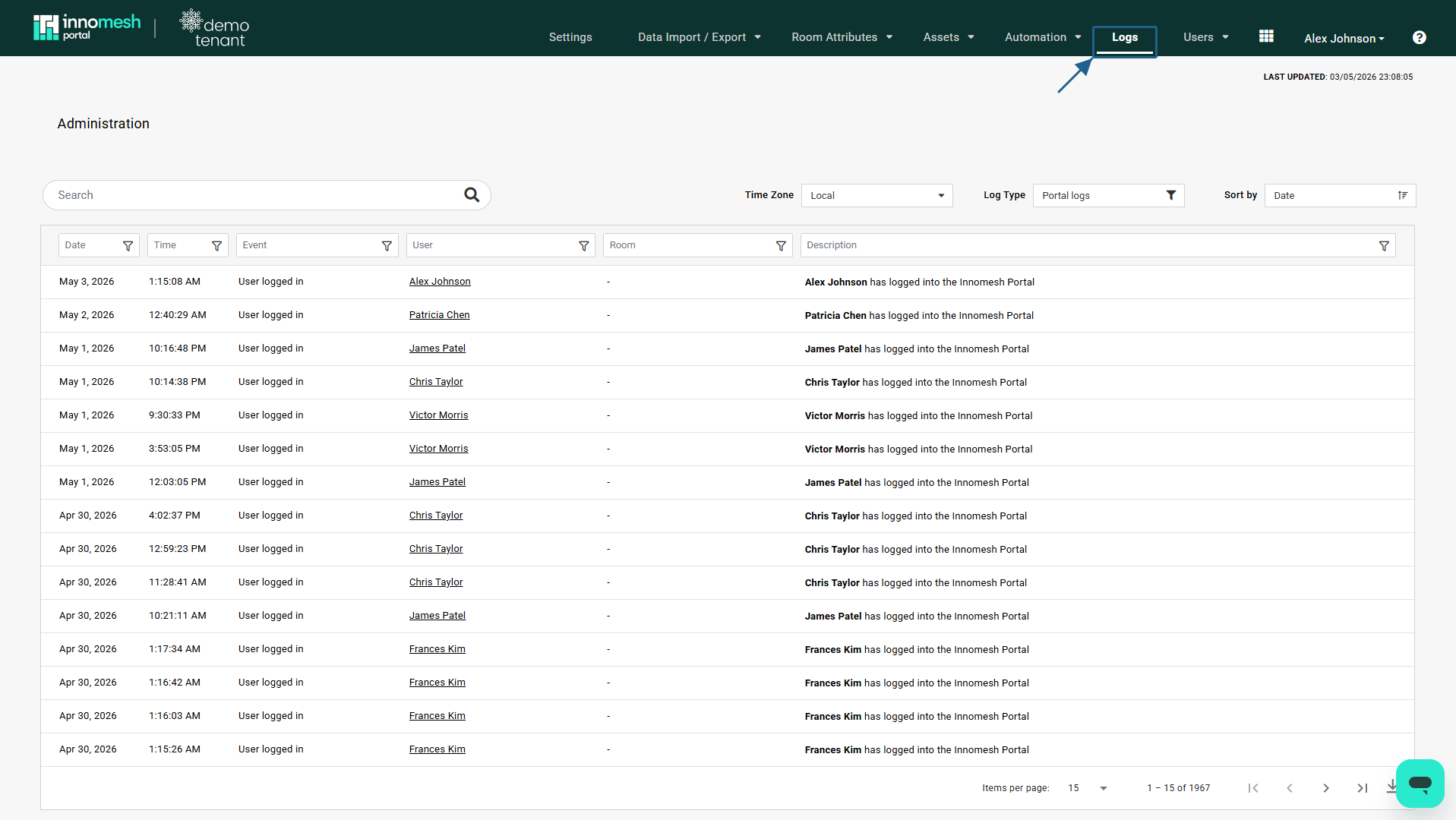 Audit Logs, Innomesh Portal
Timezone Display
Audit log timestamps can be displayed in either local time (the tenant’s configured timezone) or UTC. Toggle between these using the timezone selector in the Audit Logs view.
Searching and Exporting
Audit logs are searchable and sortable by any column. To export logs:
- Apply the desired filters.
- Click Download CSV to export the filtered results.
The CSV export includes all visible columns and respects the current filter selection.
Access Control
Audit log access is governed by RBAC. Only users with the appropriate administration role can view audit logs. For details on configuring roles, see RBAC Authorisation Guide.