

This guide explains how to configure Extron IN16xx Series switchers within Space CE. These devices are classified as a Switcher type and require input switches to function properly through AV Sources configuration.
Supported Models and Inputs
The Extron IN16xx Series includes two models with different input capabilities.
| Model | Supported Inputs |
|---|---|
| Extron IN1606 | Inputs 1 to 6 |
| Extron IN1608 | Inputs 1 to 8 |
Only the specified input numbers above are valid for each model. Other options appearing in the configuration dropdown should be ignored, as they do not apply to these devices.
Configuration Method
To control these switchers, define Input Switches under the AV Sources section. The dropdown menu presents various input options. Select only those matching your device’s actual physical ports.
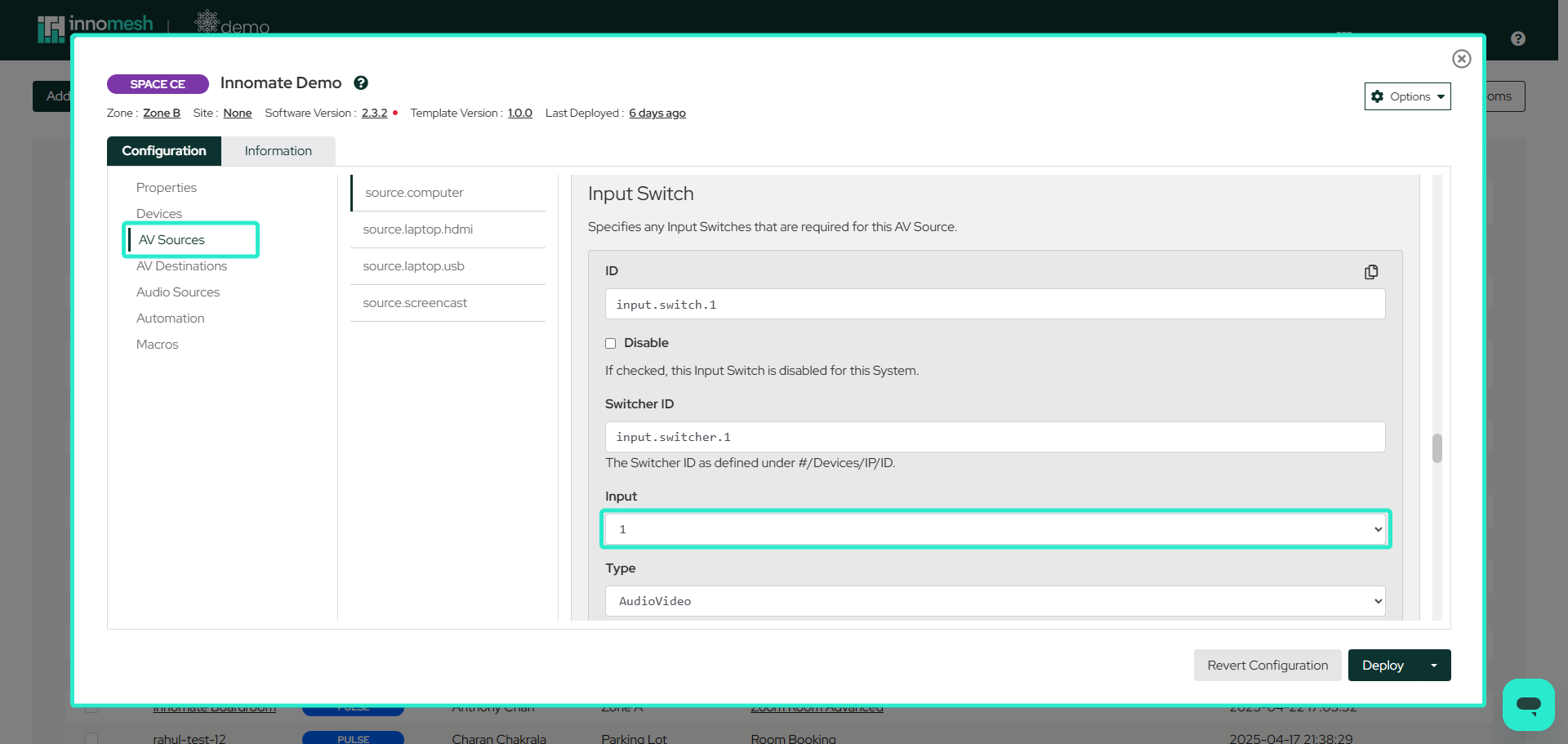 Configurations/AV Sources
Audio Control
Space CE supports a single program level and a single mute on these switchers. The driver acts on the device’s group masters 1 (gain) and 2 (mute), which are fixed in the driver, so those two groups must already be configured on the device and hold the intended output.
This has three consequences for room design:
- Block ID and Channel ID are ignored. An audio channel that names the switcher as its Device ID gets the same single volume and mute pair whatever those fields contain.
- A single fader is the maximum. There is no per input gain, no per microphone gain, and no second output level such as a foyer or recording feed.
MinimumandMaximumare in tenths of a decibel on the IN1608, not whole decibels as on an Extron DSP. Leave them blank so the driver applies its own full range.
Where the room includes a DSP, configure audio on the DSP and omit the switcher from the Audio Sources section. The switcher’s fader is intended for rooms without a DSP, which use a single Program Audio channel and nothing else.
Type set to Audio still performs an audio breakaway route independently of video.See Extron Audio Level Control for how every Extron device compares, and Configuring Extron DSPs for the DSP side.
Physical Reference
Both models have numbered ports on their back panels corresponding to their input specifications. The IN1606 provides six input connections, while the IN1608 provides eight. These physical labels serve as the reference for proper configuration.
Extron IN1606:
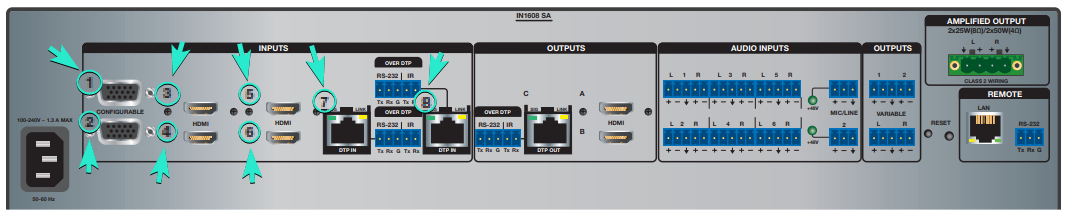
Extron IN1608:

Important Notes
- Familiarity with AV Sources documentation is essential before configuring these switchers.
- Input selection is the only required configuration element for switcher operation.
- Port numbers on device back panels directly correspond to valid configuration inputs.
- Volume and mute reach group masters 1 and 2 only. Where the room includes a DSP, configure audio on the DSP.