

The Calendar Integration displays daily room schedules within Innomesh Portal, giving support and facilities teams real-time visibility into room bookings and availability. Use it to plan maintenance windows, identify scheduling conflicts, and verify room utilisation. This feature was introduced in Innomesh v3.5.1.
Overview
Innomesh pulls calendar data from your organisation’s room booking system and presents it within the Portal interface. Each room’s schedule is displayed as a timeline showing upcoming bookings, current occupancy status, and free periods.
What You Can See
- Daily schedule: A timeline view of all bookings for the current day
- Current status: Whether the room is currently booked, in use, or available
- Upcoming bookings: The next scheduled event, including organiser and time
- Availability notifications: Real-time alerts when room availability changes
Viewing Room Schedules
- Navigate to the Rooms page in Innomesh Portal.
- Select a room to open the Room Support View.
- The Schedule panel displays the day’s bookings as a timeline.
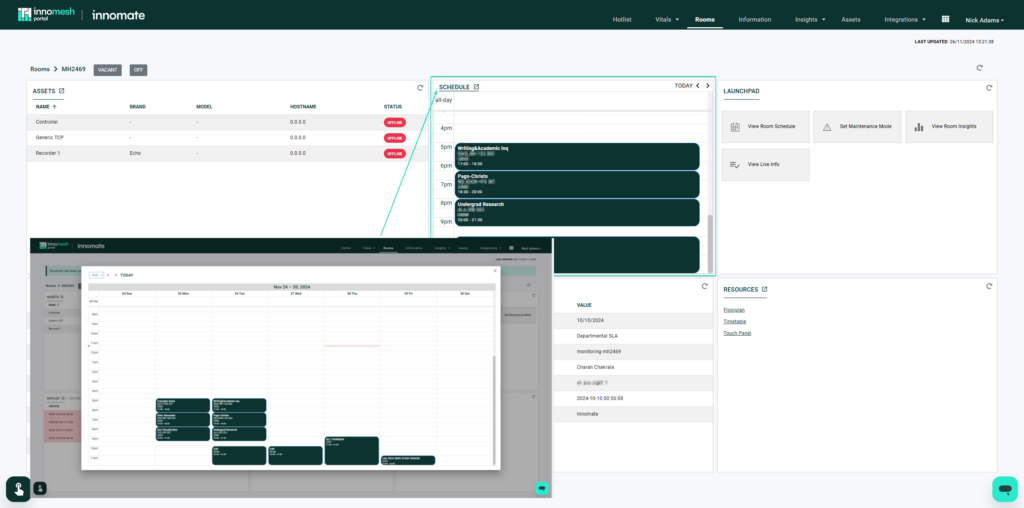 Room schedule view, Innomesh Portal
Use Cases
| Use Case | Description |
|---|---|
| Maintenance planning | Identify free periods in the room schedule to plan device maintenance or software updates without disrupting bookings. |
| Support triage | When responding to an alert, check whether the room is currently in a meeting to assess urgency and plan intervention timing. |
| Utilisation analysis | Combine calendar data with Innomesh Insights to understand how frequently rooms are booked versus actually occupied. |
📝 Note
Calendar Integration requires enablement by the Innomate support team and connectivity to your organisation’s room booking system. Contact your Innomate representative for setup details.