Macros enable dynamic functionality execution through event or time based triggers. Common applications include automatically powering rooms at set times, recalling DSP presets when rooms link, and triggering default routes on startup.
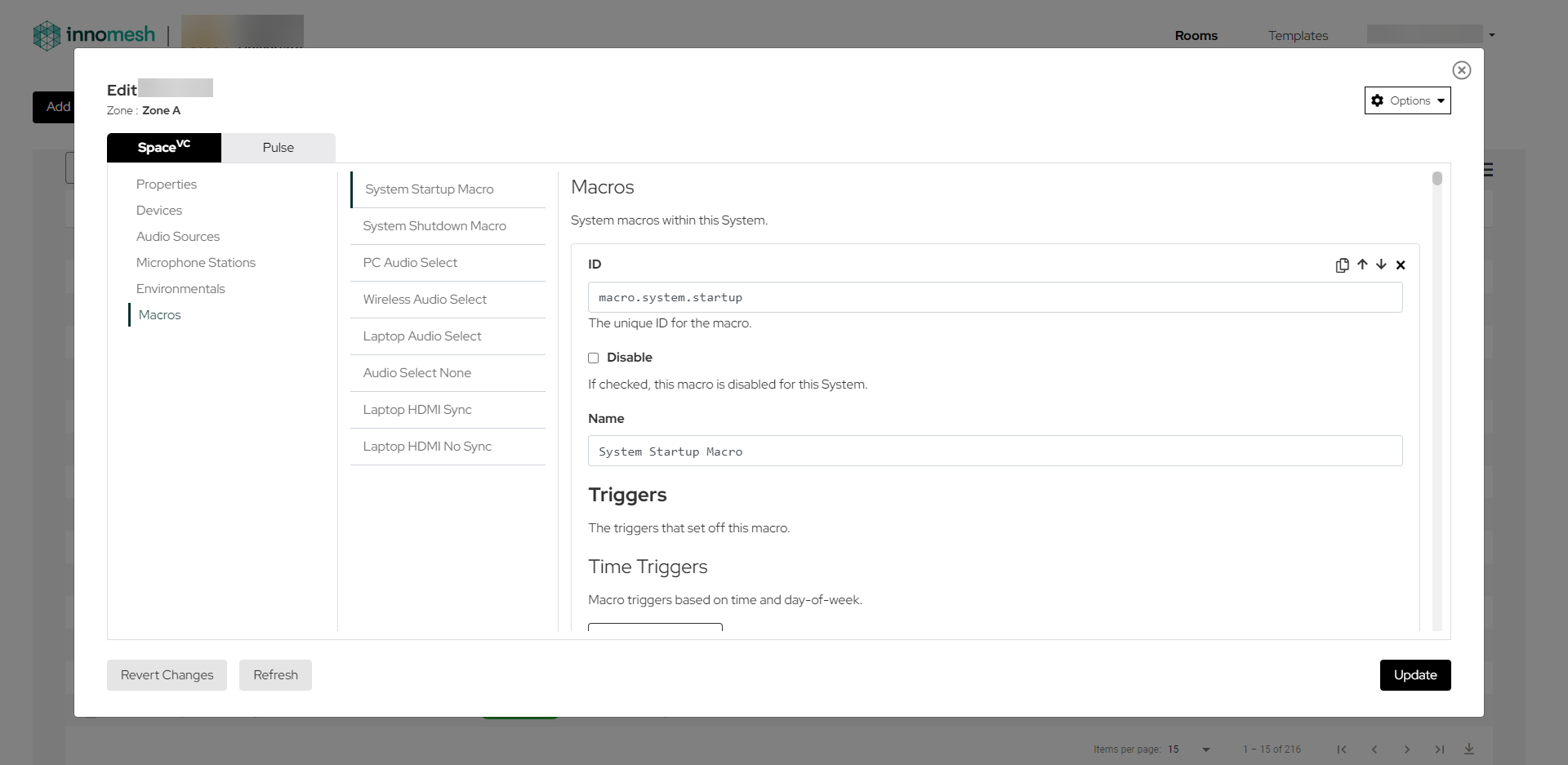
Macros consist of two components: triggers (event based or time based) and actions (what executes when triggered). Macros are created at the template level, with room-level editing available if enabled in the template’s Room Options.
Macro Structure
Each macro requires the following components:
- A unique ID to identify the macro. The recommended format is
macro.trigger.[device].operation.
- A name for easy reference
- A trigger section with its own unique ID, defining the condition that activates the macro
- An actions section below the trigger, containing the scripts to execute
- An optional Disable flag. When set to true, the macro is ignored during room operation.
Event Based Triggers
Event triggers monitor room or device state changes. Each trigger includes the following properties:
- ID: Unique identifier
- Guid: Object generating the event
- Property: Monitored property name
- Key/Index: Dictionary key or list index for accessing monitored values
- Value: Matching condition that activates the macro
Common Event Triggers
The following table lists the most commonly used event triggers. All triggers use the room object as the GUID.
| GUID | Property | Value | Key / Index | Description |
|---|
| room | PowerIsOn | true | — | Triggered when the room’s RoomMode property is not “Off” |
| room | PowerIsOn | false | — | Triggered when the room’s RoomMode property is “Off” |
| room | RoomMode | Presentation | — | Common room mode set when the room is powered on |
| room | RoomMode | Reset | — | Triggered when room “reset” is triggered from the UI |
| room | SourceIsSelected | true | AV Source ID (e.g. source.pc) | Triggered when the source is routed to ANY destination |
| room | SourceIsSelected | false | AV Source ID (e.g. source.pc) | Triggered when the source is no longer routed to ANY destination |
| room | SourceSelect | AV Source ID (e.g. source.pc) | Destination Type (e.g. Main / Preview) | Triggered when a source is routed to a destination type |
| room | SourceHasSync | true | AV Source ID (e.g. source.pc) | Triggered when a source has input sync detected on any of its defined Video Sync Devices |
| room | SourceHasSync | false | AV Source ID (e.g. source.pc) | Triggered when a source that previously had input sync detected has lost sync |
| room | RoomOccupied | true | — | Triggered when the room’s sensors have detected occupancy |
| room | RoomOccupied | false | — | Triggered when the room’s sensors are not detecting occupancy |
| room | Ready | true | — | Triggered when the room is initialised |
Room Link Events
Triggers detect when rooms link as primary or secondary, or when they unlink. Each references a specific room ID.
Audio Events
Monitor microphone muting status and audio channel level adjustments.
Sensor and Recorder Events
Detect EWIS warnings and recording transport state changes (record, pause, stop).
Time Based Triggers
These activate at specified times with configurable properties:
- Time: 24 hour format (HH:mm:ss)
- Days: Comma delimited weekday names or Weekday/Weekend
Macro Actions Reference
Actions define execution behaviour with an ID, script (lambda expression), delay, and optional device ID.
Room Actions
| Script | Description |
|---|
room.SetRoomMode("Off") | Powers off the room |
room.SetRoomMode("Presentation") | Sets the room mode to presentation. If the room is off, powers it on |
room.SetSourceSelect("source.pc", "Main Display") | Routes the provided Source ID to all destinations with the provided Destination Type |
room.SetSourceSelect("None", "Main Display") | Clears the route and triggers Source Deselection Behaviour on all destinations with the provided Destination Type |
room.SetSourceSelect("Off", "Main Display") | Triggers the Shutdown Behaviour on all destinations with the provided Destination Type |
room.SetPreview("source.pc") | Routes the provided Source ID to all preview destinations |
room.SetDestinationGroupSourceSelect("dest.group.left", "source.pc") | Routes the provided Source ID to the provided Destination Group ID |
room.SetDestinationGroupSourceSelect("dest.group.left", "None") | Unroutes the provided Destination Group ID |
room.RouteEncoderDecoderStreamByDeviceId("dev.encoder.1", "dev.decoder.1") | Sets the provided decoder’s audio and video streams to the encoder’s audio and video streams |
room.RouteEncoderDecoderVideoStreamByDeviceId("dev.encoder.1", "dev.decoder.1") | Sets the provided decoder’s video stream to the encoder’s video stream |
room.RouteEncoderDecoderAudioStreamByDeviceId("dev.encoder.1", "dev.decoder.1") | Sets the provided decoder’s audio stream to the encoder’s audio stream |
room.PairUsb("dev.remote.device", "dev.local.device") | Pairs USB peripherals on the Remote Device to the USB device on the Local Device on the first available USB route slot, otherwise on the 1st route slot |
room.PairUsb("dev.remote.device", "dev.local.device", 3) | Same as above, but the route is forced on the index provided (in this example: 3) |
📝 Note
Remote Device is generally connected to USB peripherals (e.g. keyboard, mouse). Local Device is generally connected to a PC.
Room Link Actions
| Script | Description |
|---|
room.SetDestGroupIfPrimary("dest.group.left", "source.pc") | If the room is currently linked as a primary room, routes the given source to the given destination group |
room.SetDestGroupIfSecondary("dest.group.left", "roomlink") | If the room is currently linked as a secondary room, routes the given source to the given destination group |
Video Actions
| Script | Description |
|---|
video.VideoRoute("Laptop", "Main") | Route a video source to the Main display |
video.VideoBreak("Main") | Break the video route to the Main display |
video.PreviewRoute("Laptop", "Main") | Route a video source to the Main preview monitor |
video.PreviewBreak() | Break routes to all preview monitors |
video.DisplayPowerOn("Main") | Power on the Main display and its associated devices |
video.DisplayPowerOff("Main") | Power off the Main display and its associated devices |
video.ActivateAllMotors() | Extends all motors defined against AV displays |
video.DeactivateAllMotors() | Retracts all motors defined against AV displays |
video.SetDestinationDisabled("display.1", true) | Disables or enables the AV destination with the provided ID. When disabled, it triggers its shutdown behaviour and will not be routed to |
Audio Actions
| Script | Description |
|---|
audio.SetSourceLevel("Laptop", 50) | Set the audio source level to 50% |
audio.SetSourceMute("Laptop", True) | Mute the audio source |
audio.SetMicLevel("Handheld", 50) | Set the microphone level to 50% |
audio.SetMicMute("Handheld", True) | Mute the microphone |
audio.ResetAudioChannelLevels() | Resets every audio channel to its default level |
audio.SetAudioLevel("prog.audio", 50) | Set the fader level (percentage, 0–100) of the audio source with the provided ID |
audio.SetAudioMute("prog.audio", true) | Mute or unmute the audio source with the provided ID |
audio.SetCeilingMicMute(true) | Mute or unmute all ceiling microphones |
Lighting
| Script | Description |
|---|
lighting.SetPresetLevel("Channel", "Preset") | Set a preset level on a specific lighting channel |
lighting.SetPresetLevel("Preset") | Set a preset across all lighting channels |
device.SetLevel(95) | Set a lighting channel level to 95% |
Display Device Actions
| Script | Device ID | Description |
|---|
device.SetPowerOn() | dev.display.1 | Powers on the display and sets the default volume and input |
device.SetPowerOff() | dev.display.1 | Powers off the display |
device.PollPowerOn() | dev.display.1 | Polls the display for its power state; if off, sends a power on command |
device.SetVideoInput("Hdmi1") | dev.display.1 | Sets the display’s input to Hdmi1 |
device.SetVideoMute(true) | dev.display.1 | Video mutes the display |
device.SetVideoMute(false) | dev.display.1 | Unmutes the display (video mute) |
DSP Device Actions
| Script | Device ID | Description |
|---|
device.PresetRecall("preset") | dev.dsp.1 | Recalls the given preset on the DSP device |
Camera Device Actions
| Script | Device ID | Description |
|---|
device.PresetRecall(value) | dev.camera.1 | Recalls the given preset on the camera device |
Switcher Device Actions
| Script | Description |
|---|
device.SetVolumeLevel(50) | Set an audio device volume to 50% |
device.SetVolumeMute(True) | Mute an audio device |
device.SetAudioVideoInput("Main") | Route a switcher to the AudioVideo Input “Main” |
device.PresetRecall("Custom") | Recall a custom preset on a device |
Decoder Device Actions
| Script | Device ID | Description |
|---|
device.SetVideoStream("stream") | dev.decoder.1 | Sets the decoder video stream to the specified value |
device.SetAudioStream("stream") | dev.decoder.1 | Sets the decoder audio stream to the specified value |
device.SetVideoStream("") | dev.decoder.1 | Clears the decoder video stream |
device.SetAudioStream("") | dev.decoder.1 | Clears the decoder audio stream |
Motor Device Actions
| Script | Device ID | Description |
|---|
device.Extend() | dev.screen.1 | Activates the motor device (e.g. extends a projector screen) |
device.Retract() | dev.screen.1 | Deactivates the motor device |
Power Distribution Unit (PDU) Actions
| Script | Device ID | Description |
|---|
device.TurnOn("Outlet Number") | dev.pdu.1 | Turn on the outlet using the outlet number (string or numeric) |
device.TurnOff("Outlet Number") | dev.pdu.1 | Turn off the outlet using the outlet number |
device.Reboot("Outlet Number") | dev.pdu.1 | Power cycle the outlet using the outlet number |
🚨 Caution
device.Reboot only performs power off followed by power on. This will not work as intended if powering off the outlet affects our ability to power it back on (e.g. network switches).
Touch Panel Actions
| Script | Description |
|---|
device.Lock() | Lock a touch panel |
device.Unlock() | Unlock a touch panel |
device.Flash(R, G, B, Repeat, onInterval, offInterval, "Led Position") | Flashes the LED at Led Position between the defined RGB colour (on for onInterval seconds) and off (for offInterval seconds) for Repeat cycles. After flashing, the LED reverts to its previous colour. Example: device.Flash(255, 0, 0, 10, 5, 5, "front") |
device.SetColour(R, G, B, "Led Position") | Sets the colour of the LED at Led Position to the defined RGB colour. Example: device.SetColour(0, 255, 0, "front") |
📝 Note
Qbic touch panels have valid LED positions front and side. A position of all targets all LEDs. SetColour with all terminates any aligned flashing command.
Crestron CEN-ODT-C-POE Sensor Configuration
| Script | Device ID | Description |
|---|
device.ConfigureSensor("Low", "Low", 60) | dev.dsp.1 | Configures the Crestron CEN-ODT-C-POE. Parameters: ConfigureSensor(ultrasonicSensitivity, infraredSensitivity, timeout) |
Accepted values:
ultrasonicSensitivity / infraredSensitivity: "", "Low", "Medium", "High". An empty string leaves the current setting unchanged; any valid value is persisted until the room restarts.timeout: 0 or 5–1800 seconds. 0 leaves the timeout unchanged; any valid value is persisted until the room restarts.
Related Articles
